Error message

  • Notice: unserialize() [function.unserialize]: Error at offset 0 of 9 bytes in profile_user_load() (line 257 of /home/bstudent/public_html/bsthirteen/modules/profile/profile.module).
  • Notice: Undefined property: stdClass::$taxonomy_vocabulary_2 in eval() (line 15 of /home/bstudent/public_html/bsthirteen/modules/php/php.module(80) : eval()'d code).
  • Notice: Undefined property: stdClass::$taxonomy_vocabulary_2 in eval() (line 15 of /home/bstudent/public_html/bsthirteen/modules/php/php.module(80) : eval()'d code).
  • Notice: unserialize() [function.unserialize]: Error at offset 0 of 9 bytes in profile_user_load() (line 257 of /home/bstudent/public_html/bsthirteen/modules/profile/profile.module).

Bengali font problem

1.

1. Windows Complex script Install Procedure 

2. Solaiman-Lipi Font Setting

2.

1. Solaiman-Lipi Font Setting

Windows XP:

Control Panel > Regional and Language Options> Language
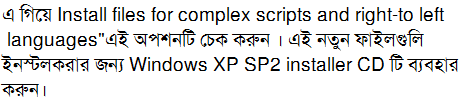
Windows Xp SP2 CD absent

IComplex 3.0.0 (Full Edition)

SolaimanLipi Font: Download

1. Mozilla Firefox

2. Internet Explorer

Firefox setting:

Tools >> Options >> Content Tab
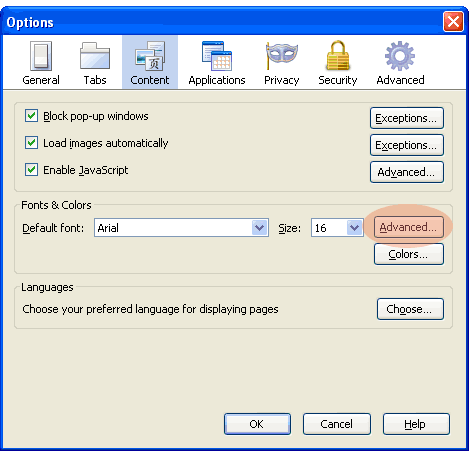
Click on Advanced

In Fonts for dropdown, select Bengali

In Proportional Select, Sans Serif and do the following and again select Serif and do the following:

Put Size as 16 or 17.

Serif, from dropdown select SolaimanLipi

Sans Serif — SolaimanLipi.

OK and OK

These selection assumes that SolaimanLipi is already installed.

Internet Explorer setting:

Tools >> Internet Options

Click Fonts >>

From Language Script dropdown select Bengali.

In Webpage font pane select SolaimanLipi.

In Plain text font pane select SolaimanLipi.

OK >> OK.


